
Cash Flow Forecast
Made for small businesses worried about the next few months.
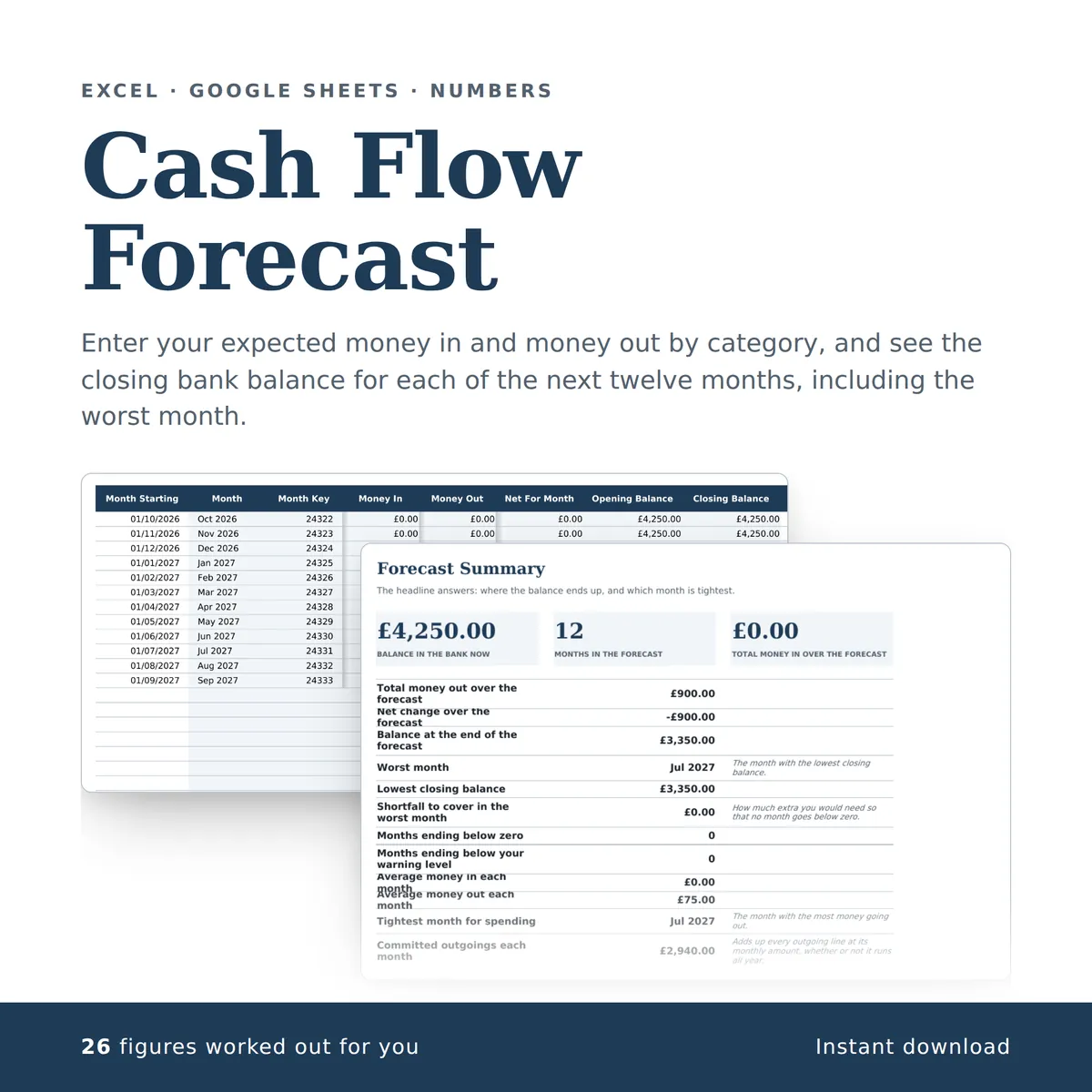
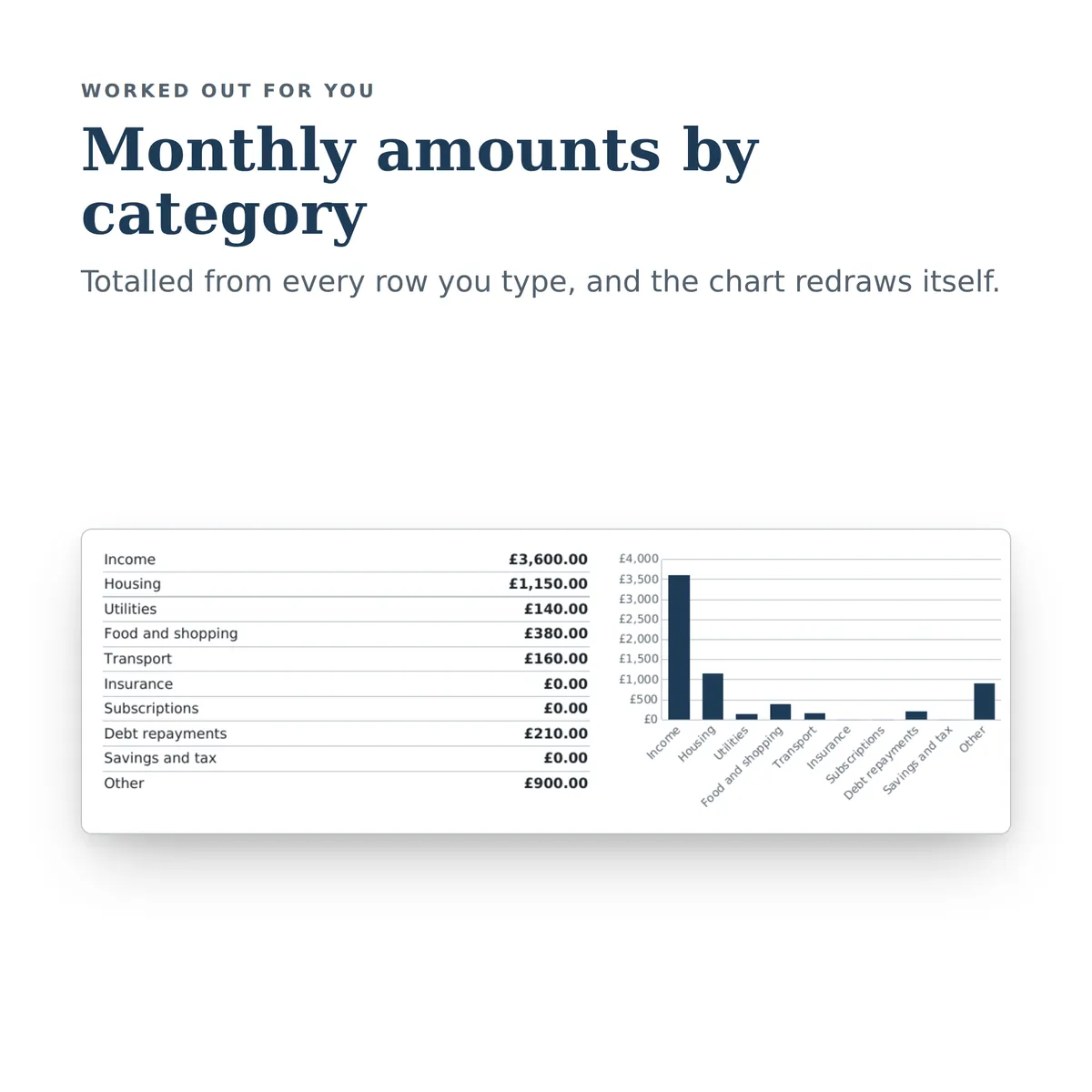
Enter your expected money in and money out by category, and see the closing bank balance for each of the next twelve months, including the worst month. The summary carries a chart that redraws itself as you type.
Of the 24 columns, you fill in 13 and the other 11 work themselves out, and all 15 figures on the summary do too. There is room for 275 rows of your own.
£4.99one payment, yours to keep
- Opens in Excel, Google Sheets and Numbers
- Delivered straight away
- No macros, nothing to install
- Change it free before you buy
Payment is handled by Stripe. Your card details go to them and never to us. Sales are final, which is why every tab, column and calculation is shown on this page first.
Already have a spreadsheet of your own? Check it for mistakes, free.
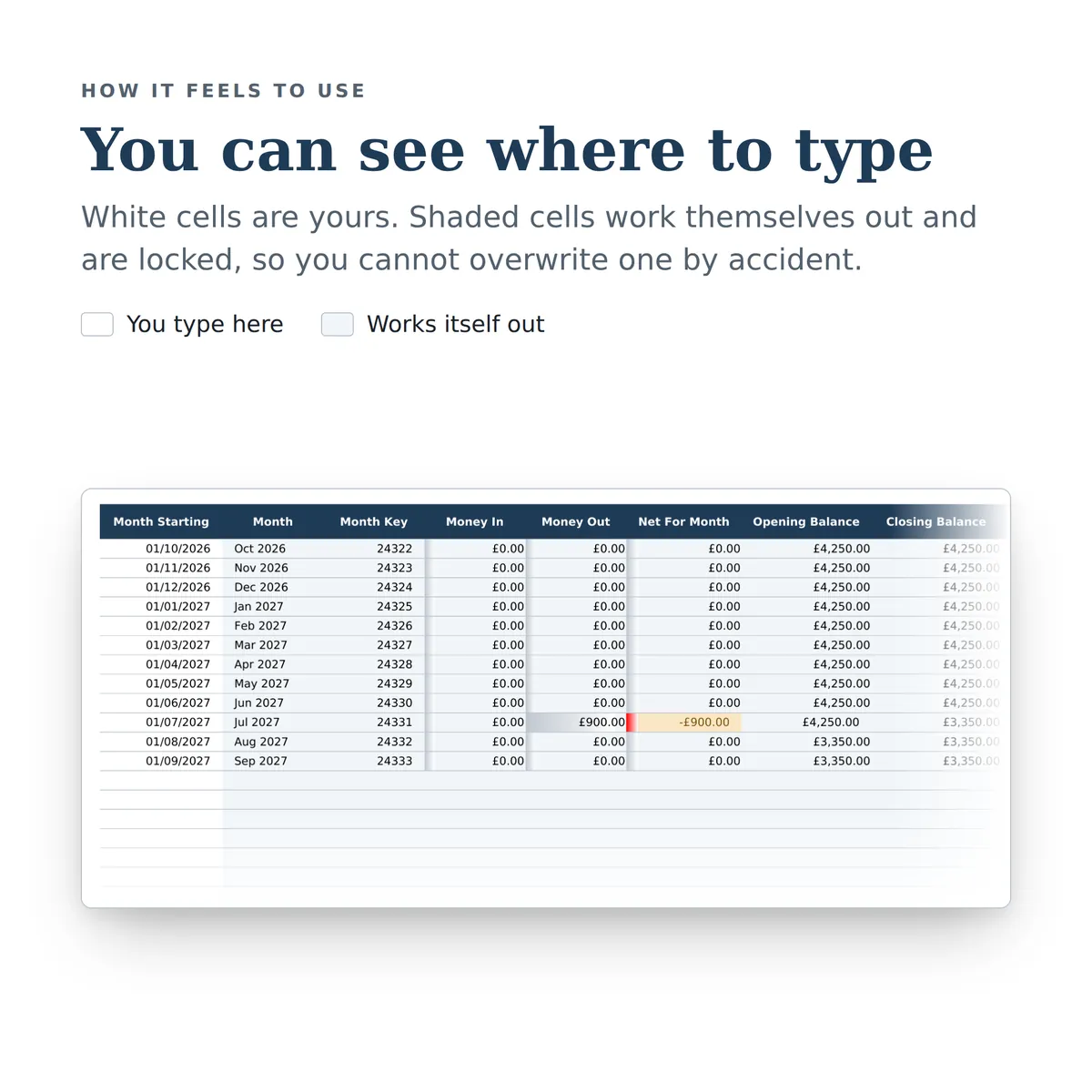
- A new row is typed into the Cash Items tab, one cell at a time, in the white cells a person fills in.
- The shaded cells in that row fill themselves in.
- The figures on the Forecast Summary tab change to include the new row.
- The chart, Monthly amounts by category, redraws with it.
Everything inside, before you pay
This is the whole design: every tab, every column and how each calculated one is worked out. White cells are yours to fill in; the shaded ones work themselves out and are locked so a formula cannot be overwritten by accident. There is room for 275 rows. Open any tab to see its columns.
Starting Position
4 columns
| Column | What goes in it |
|---|---|
| Balance In The Bank Now | Type an amount in £. |
| Balance As At | Type a date. |
| Low Balance Warning Level | Any month closing below this is flagged in the summary.Type an amount in £. |
| Notes | Type any text. |
Cash Items
11 columns
| Column | What goes in it | Worked out as |
|---|---|---|
| Item | Type any text. | |
| In Or Out | Pick one: Money in or Money out. | |
| Category | Pick one: Income, Housing, Utilities, Food and shopping, Transport, Insurance, Subscriptions, Debt repayments, Savings and tax or Other. | |
| Amount Per Month | Always enter a positive figure. The In Or Out column decides the direction.Type an amount in £. | |
| First Month | Leave blank to start from the first month of the forecast.Pick one of the Month entries on Monthly Forecast. | |
| Last Month | Leave blank if it carries on to the end of the forecast.Pick one of the Month entries on Monthly Forecast. | |
| Start Key | Used behind the scenes to work out which months this item lands in.Fills itself in. | Worked out from this row's Amount Per Month and First Month, using Month Key and Month on Monthly Forecast. The formulaIF(ISBLANK([amount]), "", IFERROR(INDEX([Monthly Forecast!month_key], MATCH([start_month], [Monthly Forecast!month_label], 0)), 0)) |
| End Key | Fills itself in. | Worked out from this row's Amount Per Month and Last Month, using Month Key and Month on Monthly Forecast. The formulaIF(ISBLANK([amount]), "", IFERROR(INDEX([Monthly Forecast!month_key], MATCH([end_month], [Monthly Forecast!month_label], 0)), 999999)) |
| Months In Forecast | Fills itself in. | Worked out from this row's Amount Per Month, Start Key and End Key, using Month Key on Monthly Forecast. The formulaIF(ISBLANK([amount]), "", COUNTIFS([Monthly Forecast!month_key], ">=" & [start_key], [Monthly Forecast!month_key], "<=" & [end_key])) |
| Total Over Forecast | Fills itself in. | The Amount Per Month times the Months In Forecast. The formulaIF(ISBLANK([amount]), "", ROUND([amount] * [months_applied], 2)) |
| Notes | Type any text. |
Monthly Forecast
9 columns
| Column | What goes in it | Worked out as |
|---|---|---|
| Month Starting | Use the first day of each month.Type a date. | |
| Month | Fills itself in. | Worked out from this row's Month Starting. The formulaIF(ISBLANK([month_start]), "", TEXT([month_start], "MMM YYYY")) |
| Month Key | Used behind the scenes to keep the months in order.Fills itself in. | Worked out from this row's Month Starting. The formulaIF(ISBLANK([month_start]), "", YEAR([month_start]) * 12 + MONTH([month_start])) |
| Money In | Fills itself in. | Worked out from this row's Month Starting and Month Key, using Amount Per Month, In Or Out, Start Key and End Key on Cash Items. The formulaIF(ISBLANK([month_start]), "", SUMIFS([Cash Items!amount], [Cash Items!direction], "Money in", [Cash Items!start_key], "<=" & [month_key], [Cash Items!end_key], ">=" & [month_key])) |
| Money Out | Fills itself in. | Worked out from this row's Month Starting and Month Key, using Amount Per Month, In Or Out, Start Key and End Key on Cash Items. The formulaIF(ISBLANK([month_start]), "", SUMIFS([Cash Items!amount], [Cash Items!direction], "Money out", [Cash Items!start_key], "<=" & [month_key], [Cash Items!end_key], ">=" & [month_key])) |
| Net For Month | Fills itself in. | Worked out from this row's Month Starting, Money In and Money Out. The formulaIF(ISBLANK([month_start]), "", [income] - [outgoings]) |
| Opening Balance | Fills itself in. | Worked out from this row's Month Starting and Month Key, using Balance In The Bank Now on Starting Position and Net For Month and Month Key on Monthly Forecast. The formulaIF(ISBLANK([month_start]), "", SUM([Starting Position!opening_balance]) + SUMIFS([Monthly Forecast!net], [Monthly Forecast!month_key], "<" & [month_key])) |
| Closing Balance | The total row shows the lowest closing balance of the whole forecast.Fills itself in. | Worked out from this row's Month Starting and Month Key, using Balance In The Bank Now on Starting Position and Net For Month and Month Key on Monthly Forecast. The formulaIF(ISBLANK([month_start]), "", SUM([Starting Position!opening_balance]) + SUMIFS([Monthly Forecast!net], [Monthly Forecast!month_key], "<=" & [month_key])) |
| Notes | Type any text. |
Forecast Summary
15 figures
| Figure | Worked out as |
|---|---|
| Balance in the bank now | The total of Balance In The Bank Now on Starting Position. The formulaSUM([Starting Position!opening_balance]) |
| Months in the forecast | The number of rows on Monthly Forecast with Month Key filled in. The formulaCOUNT([Monthly Forecast!month_key]) |
| Total money in over the forecast | The total of Money In on Monthly Forecast. The formulaSUM([Monthly Forecast!income]) |
| Total money out over the forecast | The total of Money Out on Monthly Forecast. The formulaSUM([Monthly Forecast!outgoings]) |
| Net change over the forecast | The total of Net For Month on Monthly Forecast. The formulaSUM([Monthly Forecast!net]) |
| Balance at the end of the forecast | Worked out from Closing Balance and Month Key on Monthly Forecast. The formulaIFERROR(INDEX([Monthly Forecast!closing_balance], MATCH(MAX([Monthly Forecast!month_key]), [Monthly Forecast!month_key], 0)), 0) |
| Worst month | The month with the lowest closing balance. Worked out from Month and Closing Balance on Monthly Forecast. The formulaIFERROR(INDEX([Monthly Forecast!month_label], MATCH(MIN([Monthly Forecast!closing_balance]), [Monthly Forecast!closing_balance], 0)), "") |
| Lowest closing balance | The smallest Closing Balance on Monthly Forecast. The formulaMIN([Monthly Forecast!closing_balance]) |
| Shortfall to cover in the worst month | How much extra you would need so that no month goes below zero. Worked out from Closing Balance on Monthly Forecast. The formulaIF(MIN([Monthly Forecast!closing_balance]) < 0, ABS(MIN([Monthly Forecast!closing_balance])), 0) |
| Months ending below zero | The number of rows on Monthly Forecast where Closing Balance is below 0. The formulaCOUNTIF([Monthly Forecast!closing_balance], "<0") |
| Months ending below your warning level | Worked out from Closing Balance on Monthly Forecast and Low Balance Warning Level on Starting Position. The formulaCOUNTIF([Monthly Forecast!closing_balance], "<" & SUM([Starting Position!low_balance_alert])) |
| Average money in each month | Worked out from Money In and Month Key on Monthly Forecast. The formulaIFERROR(SUM([Monthly Forecast!income]) / COUNT([Monthly Forecast!month_key]), 0) |
| Average money out each month | Worked out from Money Out and Month Key on Monthly Forecast. The formulaIFERROR(SUM([Monthly Forecast!outgoings]) / COUNT([Monthly Forecast!month_key]), 0) |
| Tightest month for spending | The month with the most money going out. Worked out from Month and Money Out on Monthly Forecast. The formulaIFERROR(INDEX([Monthly Forecast!month_label], MATCH(MAX([Monthly Forecast!outgoings]), [Monthly Forecast!outgoings], 0)), "") |
| Committed outgoings each month | Adds up every outgoing line at its monthly amount, whether or not it runs all year. The total of Amount Per Month on Cash Items where In Or Out is “Money out”. The formulaSUMIF([Cash Items!direction], "Money out", [Cash Items!amount]) |
More in Business
-

Freelance Invoice & VAT Tracker
Tracks every invoice sent, what is outstanding, what is overdue, and how much VAT is due this quarter, with a reusable client list.
22 figures work themselves out£4.99
-

Small Business Bookkeeping
A simple set of books for a one-person business: record every payment received and every business cost, tag each one with a category, and see totals by category, totals by month and profit so far this year ready for the tax return.
26 figures work themselves out£4.99
-
Job Quotes & Margin Tracker
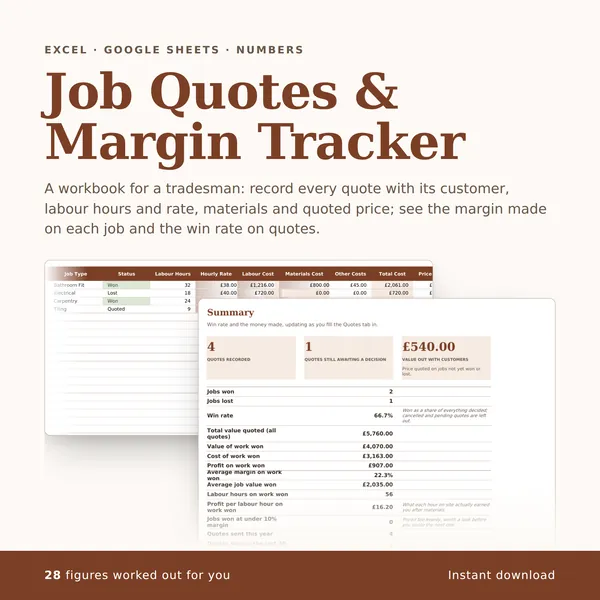
A workbook for a tradesman: record every quote with its customer, labour hours and rate, materials and quoted price; see the margin made on each job and the win rate on quotes.
28 figures work themselves out£4.99
-

Etsy Seller Profit Tracker
Record every Etsy sale with fees, postage and materials, and see what each order and each item actually earns.
35 figures work themselves out£4.99