Describe a spreadsheet. Get the spreadsheet.
Tell us what you want to keep track of. You get a finished file, with tabs, formulas, dropdowns and totals, that opens in Excel, Google Sheets or Numbers. No account.
Nothing you typed is lost. Try it again, or start somewhere that is already known to work.
- 1Describe itIn your own words. No jargon, no template to pick.
- 2Preview itSee every tab, column and formula before you decide. Change anything.
- 3Download itA finished .xlsx that opens in Excel, Google Sheets or Numbers.
You have paid for , and it has not downloaded yet. It is kept in this browser until it does, and the spreadsheet below is still here too.
Also kept in this tab: .
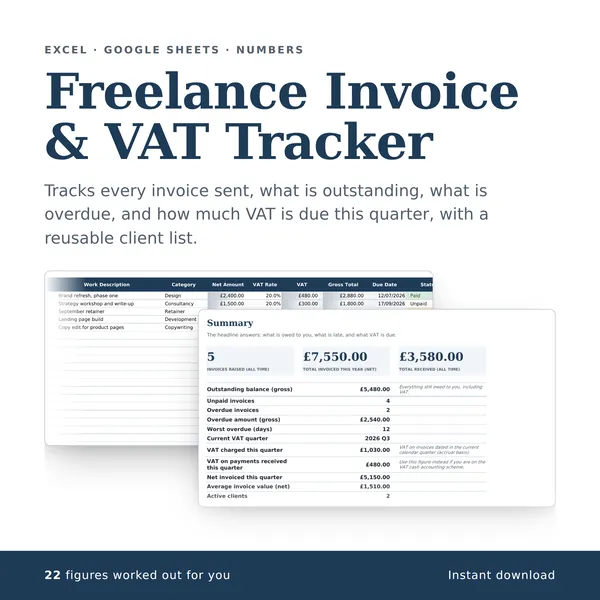
What it looks like
Every tab, column and calculation
Payment is handled by Stripe. Your card details go to them and never to us. One payment buys the spreadsheet you are looking at; change it afterwards and that is a different spreadsheet.
Your spreadsheet is downloaded
- On a phone, find it in Files or Downloads and open it with Excel, Google Sheets or Numbers.
- On a computer, open it from your Downloads folder.
- Start on the first tab, Start here. It explains every column and shows you where to type.
- Once your own figures are in it, check it for mistakes. That is free too, and works on any spreadsheet you have.
We do not store your spreadsheet or anything you put in it. You describe the structure you want; we send back that structure with a few example rows, held only until you collect it. When you design a spreadsheet here, your figures never reach us: what you type into the file stays on your own computer.